See work as it happens
Planned visits and mobile checks give field teams a consistent way to record what they see. Managers can review visit status, photographs and issues across locations without relying on scattered updates.
Retail execution & field operations / Product concept
Bring store visits, field observations and corrective actions into one view. Help teams prioritise work and give managers clearer oversight across locations.
Discuss this concept
A practical example · Concept
A distributor wants to see which display issues need attention across its agreed store network. A field representative records a check and a manager assigns the follow-up.
ONE POSSIBLE FLOW
Illustrative workflow · proposed for tailoring and testing with your business
See the idea in context
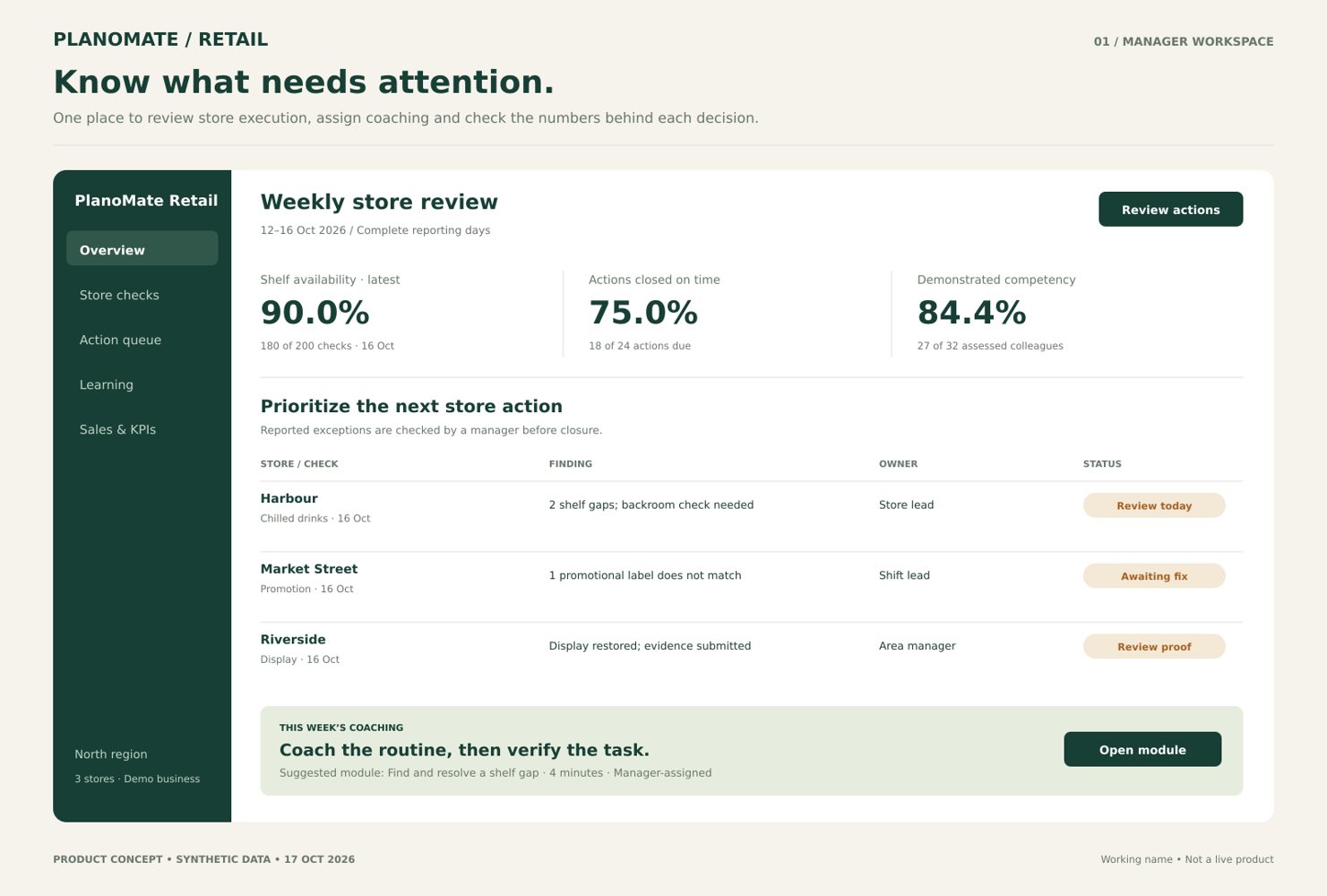
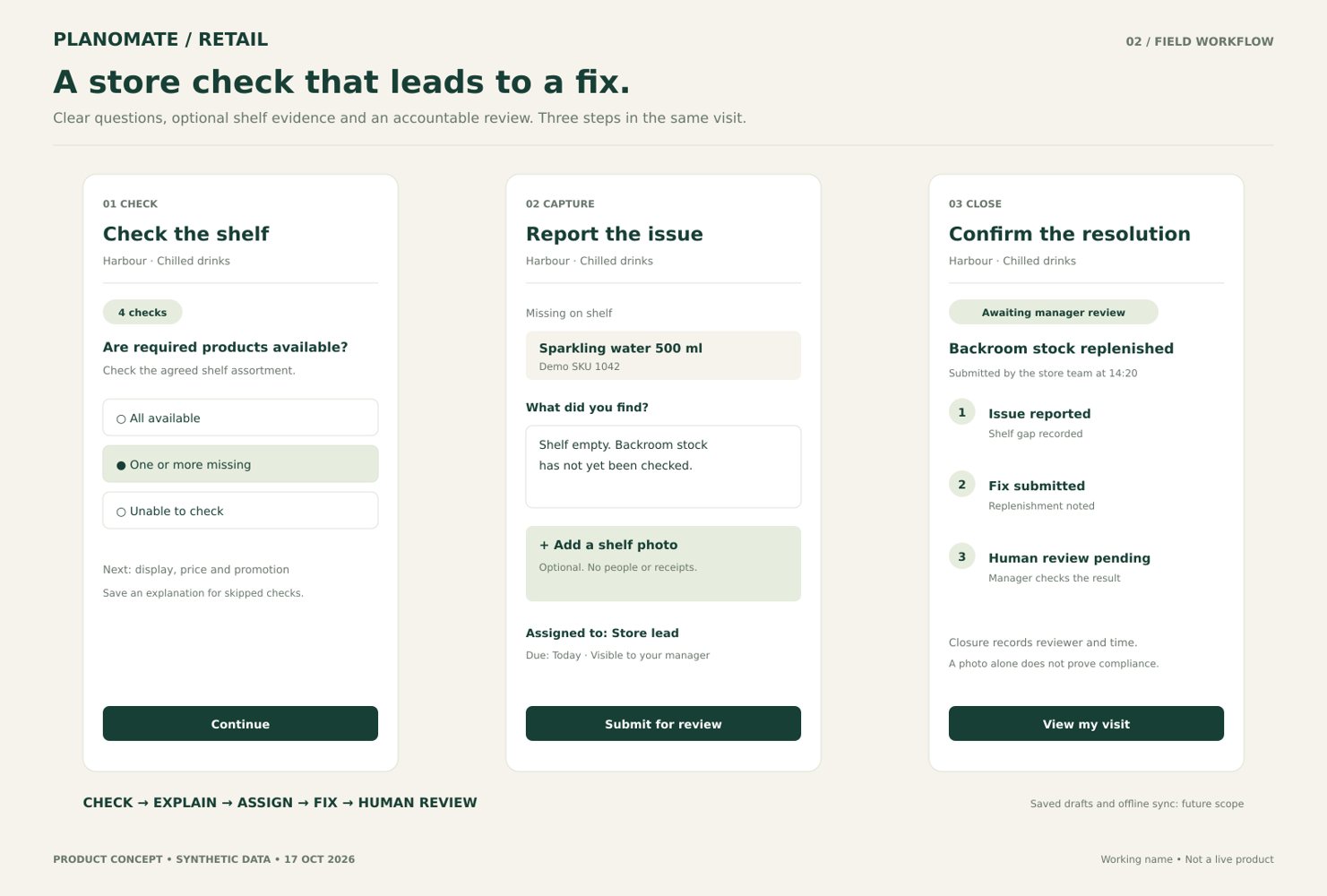
Illustrative interface concepts with synthetic data. These show a possible experience, not working software.
Today’s store activity
Central Market · Example
Display issue · Example
Weekly team view · Example
The business challenge
Information from stores often arrives at different times and in different formats. Without a shared record, managers can spend time finding out which visits happened, what was observed and who is following up.
Give each visit a place in the plan, each observation useful context and each issue an owner. The proposed workflow connects field activity with the people who need to review and act on it.
Designed around real work
These are intended benefits to explore and validate in a pilot.
Planned visits and mobile checks give field teams a consistent way to record what they see. Managers can review visit status, photographs and issues across locations without relying on scattered updates.
When a check identifies an issue, a corrective action can be assigned to a named owner. Follow-up and verification make the path from observation to resolution easier to understand.
Bring field observations, visit records and evidence into an organized view. Teams can review recurring execution issues and decide where to focus, using definitions agreed for the pilot.
See how it works
A proposed workflow, shaped around your business.
Choose locations, priorities and the checks to complete.
Record observations and photographs against the agreed standards.
Give each issue an owner and a clear next action.
Check the response and look for patterns across locations.
An illustrative preview
These are design concepts with synthetic examples, not evidence of working software.
Designed for your business
FMCG brands, distributors, retail chains and merchandising teams with work across multiple locations.
The concept is designed to help teams make information visible, coordinate responsibilities and make better-informed decisions. Benefits depend on the process, data and adoption; no quantified results are claimed.
Essential capabilities
Proposed features to define and test with the business.
Set locations, schedules and priorities for field teams.
Record agreed shelf, price, display or promotion checks.
Attach visual context to an observation or visit.
Assign issues and review completion with the responsible team.
Review field activity and outstanding work across participating locations.
Designed to fit your business
These are possibilities for a tailored solution, not existing integrations or promised features. Any implementation depends on access, technical compatibility, development and agreement.
CONNECT
A separately scoped connection could bring approved store lists or visit information from an existing sales system. Data ownership, permissions and mapping would be agreed first.
ASSIST
An optional assistant could summarize written observations for a manager to review. Photo interpretation or automated findings would require separate evaluation and retailer approval.
REVIEW
Field teams confirm what happened; managers decide on and verify the corrective action.
LEARN
Compare completed visits and verified action closure against agreed pilot definitions.
Implementation & integration
An agreed store list, location permissions, visit schedule, checklists, team roles and rules for photographs.
Setup, access, data import, onboarding and testing would be scoped around the agreed use case. Configuration, integration, training and support are optional services to agree separately; none are represented as included.
Use of retailer locations and images requires the relevant permissions. Sales changes should not be attributed to the application without appropriate evidence.
Questions worth asking
Retailers, FMCG brands, distributors and field agencies coordinating approved work across stores.
The proposed pilot would start with the checks and responsibilities agreed with your business.
Any integration would need separate scoping, approval and testing; no live connection is established.
This is a product concept or proposed application, not a confirmed commercial launch. Features, availability, integrations and commercial terms depend on development and agreement.
PlanoMate can discuss setup, training and support as separately scoped services. Their scope, price and terms would be agreed before work begins.
Product concept
Tell us about your team and the challenge. We can discuss the concept, the information needed and whether a focused pilot makes sense.
Discuss PlanoMate RetailFeatures, availability, integrations and commercial terms are subject to development and agreement.